Ports list and SWAG setup
No Conflicts between ports
You can use your own ports
First, you need to port forward the port 80 and 443
Port Forwarding Port 80 and 443
Port forwarding is a process that allows you to access a device or service on your home network from the Internet. This can be useful for running a web server, hosting a game server, or accessing other devices on your home network remotely.
In this tutorial, we will show you how to port forward port 80 and 443, which are used for HTTP and HTTPS traffic, respectively.
Prerequisites
Before you begin, you will need the following:
- A router with port forwarding capabilities
- The IP address of the device you want to access
Step 1: Access your router's web interface
To access your router's web interface, you will need to know its IP address. This is usually listed in the documentation that came with your router, or you can try looking up the default IP address for your router's make and model online.
Once you have the IP address, open a web browser and enter it into the address bar. You will be prompted to enter a username and password. If you have never changed these, you can try looking up the default login credentials for your router online.
Step 2: Find the port forwarding section
Once you are logged in to your router's web interface, look for a section called "Port Forwarding," "NAT," or "Virtual Servers." The exact location of this section may vary depending on your router's make and model.
Step 3: Create a new port forwarding rule
In the port forwarding section, you will need to create a new rule for each port you want to forward. To forward port 80 (HTTP), create a new rule with the following settings:
- Protocol: TCP
- External Port: 80
- Internal Port: 80
- Internal IP Address: (the IP address of the device you want to access)
To forward port 443 (HTTPS), create a new rule with the following settings:
- Protocol: TCP
- External Port: 443
- Internal Port: 443
- Internal IP Address: (the IP address of the device you want to access)
Step 4: Save your changes
After you have created the port forwarding rules, be sure to save your changes and apply them to your router. This may require a reboot of your router.
Step 5: Test your port forwarding
To test your port forwarding, you can use a tool such as canyouseeme.org. Simply enter the port number you want to test and it will check if the port is open and available.
If everything was set up correctly, your port should be open and you should be able to access the device or service on your home network from the Internet.
I hope this tutorial was helpful in explaining how to port forward port 80 and 443. If you have any questions or need further assistance, feel free to ask.
Web Ports ( Swag )
Swag IP Setup
- Get the IP and the network from the swag container

- Select a container that you are going to use
- Click on
Duplicate/Edit - Scroll down to
Advanced container settingsand clickNetwork - Change the netowrk to the swag network and change the IPv4 address
Example172.26.0.6- Make sure you have the swag ip
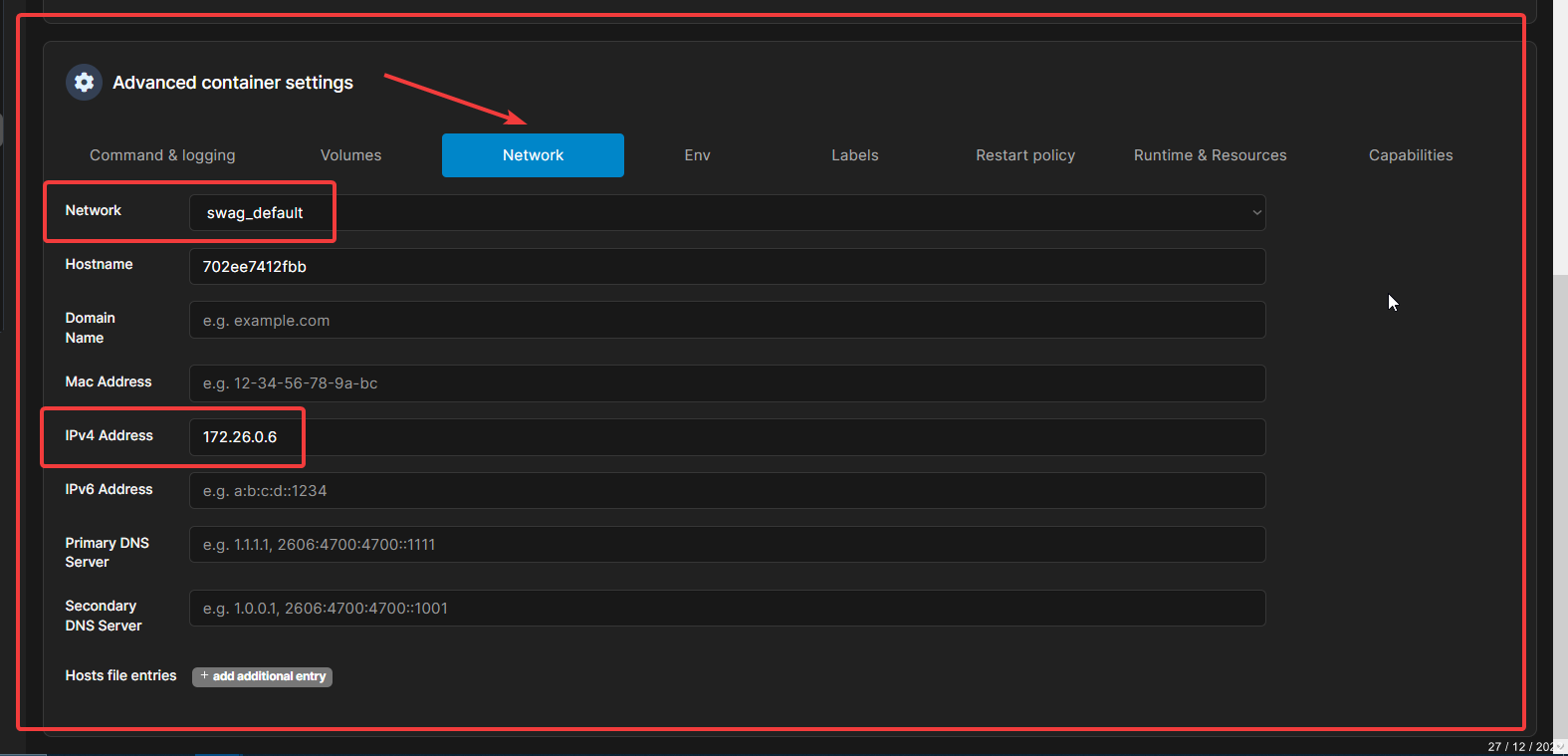
- Deplay the container
Address rooms
172.( SWAG ROOM ).0.( APP NUMBER )
Address Setup
| Location | Name | Port | Adress |
|---|---|---|---|
| Router | HTTP | 80:80 | ( DEFAULT GATEWAY ) |
| Router | HTTPS | 443:443 | ( DEFAULT GATEWAY ) |
| Docker - Portainer | Swag | 80:80 , 443:443 | ( SERVER IP ON PORT 80 or 443 |
| Docker - Portainer | Duckdns | - |
Local IP Addresses
Our SWAG room will be at 172.15.0.2
Media : 8110 - 8119
| Port | Name | Adress Example | End result |
|---|---|---|---|
| 8110 | jellyfin | 172.15.0.4:8110 | jellyfin.subdomain.duckdns.org |
| 8111 | Jellyseerr | 172.15.0.5:8111 | jellyseerr.subdomain.duckdns.org |